
What does it cost to play the Points and Miles game?
Points and Miles collectors often have a lot of credit cards to manage, and YNAB is a perfect tool to help! This post has tips, tricks and methods for making sure you always meet your Minimum Spend requirements, don't miss a rebate and can calculate the true cost of what it costs to earn those points and miles!
YNAB TIPS
12/4/20257 min read
If you love airline miles, hotel points, and credit card rewards, you know the game can get really fun — and really chaotic. Minimum spend deadlines, annual fees, tracking the “real” cost of playing the game… it’s a lot. But if you use YNAB, there are some ways to set up your plan to help you keep track of it all, and get some useful data too.
In this post I'll walk you through setting up YNAB and Todoist to:
Set up your YNAB plan
Enter transactions related to points earning, card benefits like rebates and travel credits
Track your minimum spend requirements
View your Reflect report(s) to see what you've spent and recouped from card perks
Note: This post assumes you're familiar with YNAB, maybe even a slightly advanced user and with ToDoist. If you're just starting out and this post just confuses you, I'm happy to help you out in a one-on-one coaching session...that's what I'm here for!
Jump to Sections in this article:
🎯 Step 1: Create a Dedicated Category and Project
Create a single category anywhere in your YNAB plan. For this blog, I'll call it "Points Cost". Assign enough money to this category to cover your annual fees. Also create a Project or Sub-Project in ToDoist for your Points and Miles Hobby.
💳 Step 2: Categorize your Annual Fees
All annual fees paid to your cards must get categorized in the Points Cost category. I strongly suggest adding them as repeating (yearly) scheduled transactions.
Step 2A: Set a task in ToDoist about a week before each card's annual fee is due, to review that card's benefits and decide if you are going to keep it open or close it that year. Make this a yearly repeating task.
🧾 Step 3: Track your Benefits and Perks
This step is broken into topics, but it's important to note that I don't address the less tangible perks like free lounge access, free breakfasts or no carry-on baggage fees. I also do not recommend tracking your points in YNAB, because of the variability of the "value" of those points, and it artificially inflates your overall net worth. Plus, there are other apps dedicated to that task.
Tracking Rebate-Style Perks:
Perks that give you a credit to your statement after you do some spend are rebate-style perks. As an example, I will use the Dunkin credit from the Amex Personal Gold card as an example, which gives you up to $7 back per month, or $84 total per year. This card's annual fee is currently $325, so if you were to take full advantage of the Dunkin credit, you'd pay an effective fee of $241 ($325-$84). Here's how to show this in YNAB:
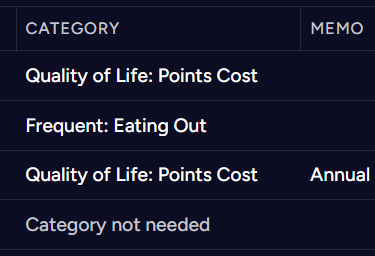
Enter your Annual Fee, using the Points Cost category
Add your Dunkin spending as a normal transaction, using whatever "Dining out" themed category you have.
When Amex gives you the credit, enter it with the Points Cost category
4. Then MOVE the $7 from the Points Cost category back to your Eating Out category:
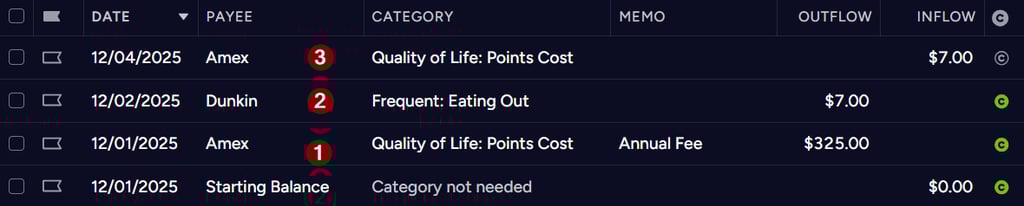
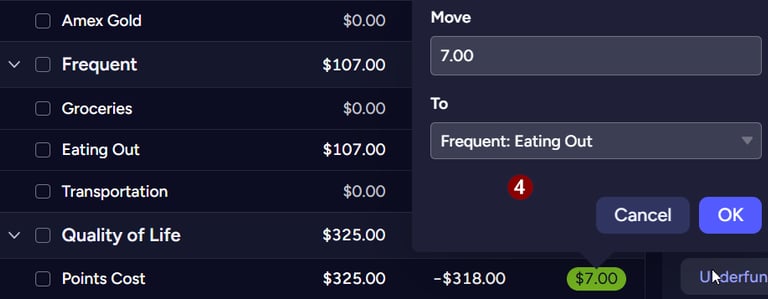
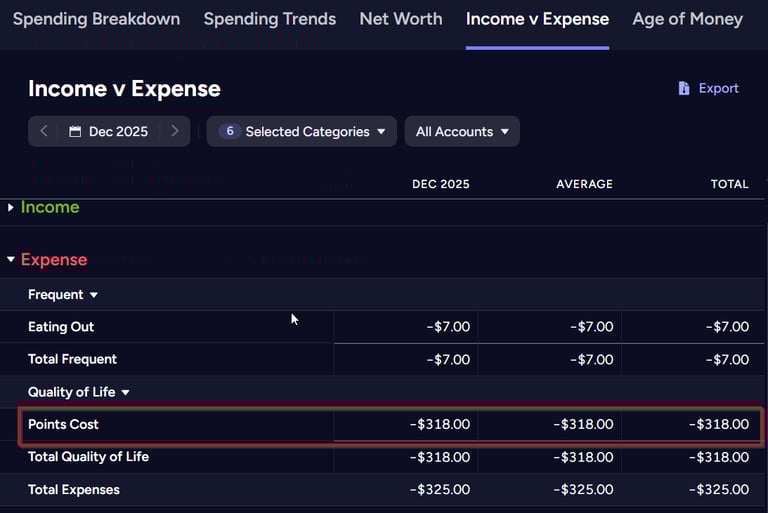
What this does: YNAB will record the rebate as Inflow to the Points Cost category, which is like negative spending. In the Reflect "Income vs Expense" report, YNAB will show a total Expense of $318 for your Points Cost Category. Because you moved the money from Points Cost to Eating Out, you've also reimbursed yourself for what you spent on coffee, however, the Reflect report will show you spent the $7.
If you repeat these steps for all your annual fees on all cards, and all the rebate perks (Resy credits, UberEats and Lyft credits, $10 dining credits, etc), then at the end of the year you will have a total of the net amount you paid for all those cards, minus what you "earned" back.
Tracking Credit-Style Perks:
Perks that give you a credit to spend on a specific thing, such as a $50 Hotel Credit, or $300 Travel Credit, are a little trickier to track in YNAB - but it can be done!
Think of these perks like pre-paid gift cards that can only be used for a specific category of item at a specific retailer. You've already "spent" the money, in the form of your annual credit card fee, but you haven't yet "cashed in" for the item/value it was spent on. In YNAB, you can treat this like a gift card.
Create a new Cash (unlinked) Account. I call it Travel Credits for this example.
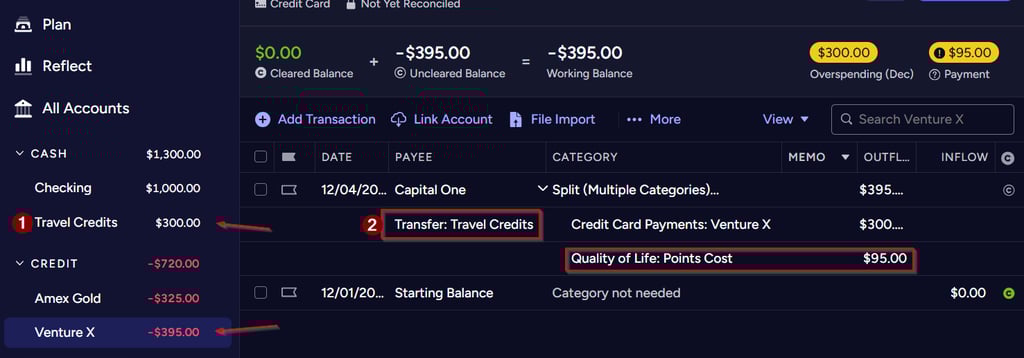
When you pay your Annual Fee, enter it as a split transaction. The amount of the credit is entered as a transfer from the credit card account to the Travel Credits account. I am using the Venture X as an example, which currently has a $300 travel credit and a $395 annual fee.
Notice what happens here:
the full annual fee of $395 is charged to the credit card, but only $95 of that is coming from the Points Cost category. This means in your Refect report, the "cost" of having this card will show as $95
the Travel Credits account now has $300 in it
YNAB thinks the card is overspent - this is because you've "created cash" in YNAB by taking credit spending and putting it in a cash account. This overspent warning will appear for the rest of this month, but that is ok...it will go away next month, and all will be well...IF you follow the rest of the steps below!
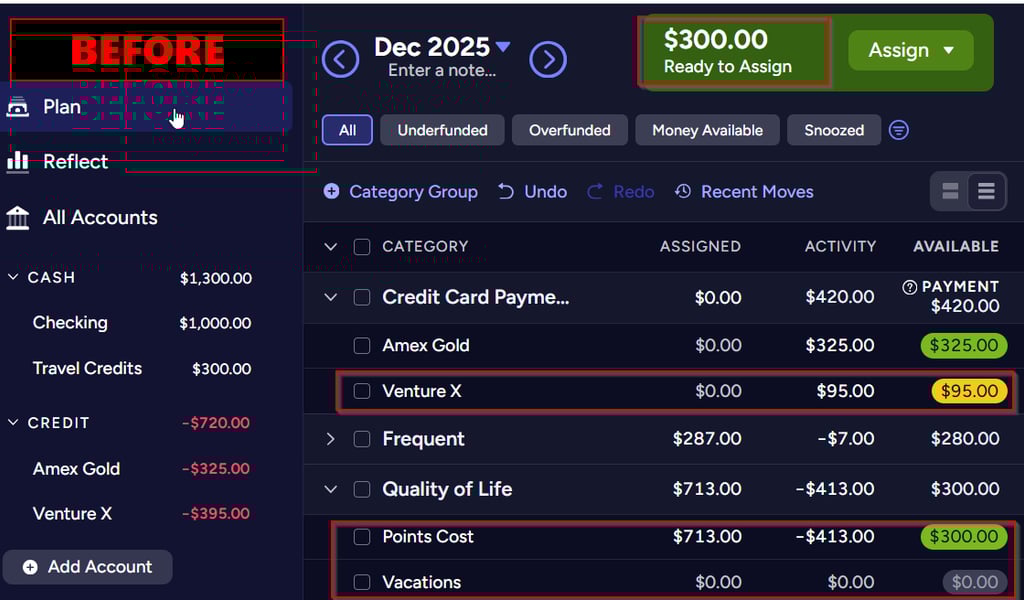
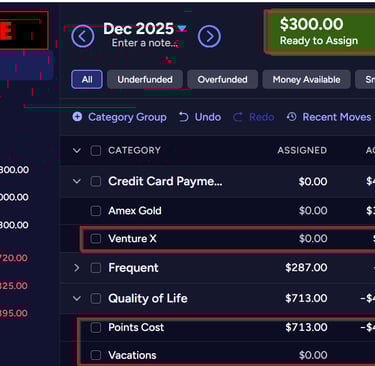
After entering your split transaction, go to your Plan. Notice the new amount in Ready to Assign? That is the cash you "created" - remember, it isn't really cash but a travel credit you can only spend per the card's terms. In this case, I can only spend it on travel booked through Capital One's travel portal. Notice as well that the Payment amount for my Venture X is yellow...there is not enough set aside to pay for the full annual fee. Read on for the next VERY IMPORTANT set of steps to get your Plan fixed!
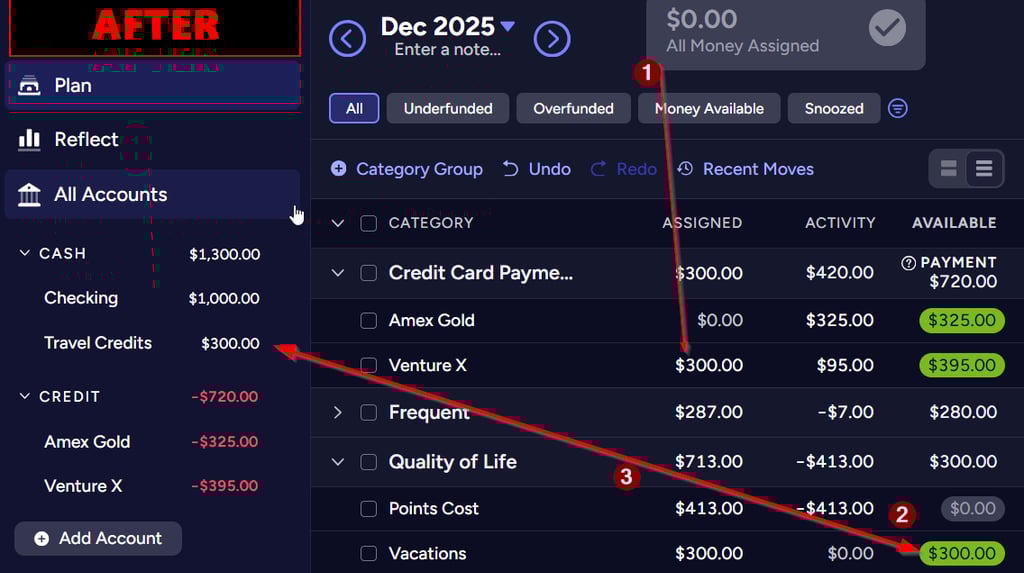
Do not skip or miss these steps!
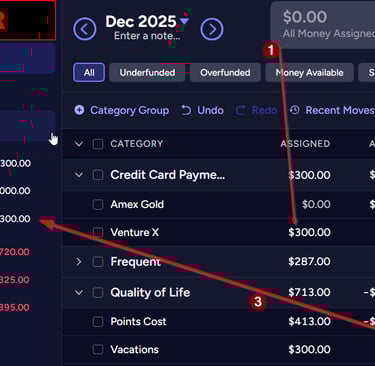
First, assign $300 to your Credit Card Payment line.
Second, move the extra money from the Points Cost to the Vacations category (or whatever category you will spend your travel credit from. You may want a specific "Venture X Travel Credit" category just for this.)
IMPORTANT! Always make sure that your balance in the Travel Credits Account always matches the Available amount in the Vacations category!! If they are ever out of sync, you MUST move money from somewhere else in your plan to/from the Vacations category to match the balance of the Travel Credits account. You can NOT use this money for any other spending, so therefore it cannot be assigned to any other category!
Finally, Create a ToDoist task to spend your travel credit before it expires. If you let the credit expire and lose it, you must enter a transaction in YNAB to "zero out" the available amount in the Travel Credit account and Vacations category, because you no longer have that credit to spend.
Tracking your Minimum Spend
Making sure you hit your Minimum Spend requirement on a new card in order to earn the Sign-Up Bonus is super easy with YNAB and ToDoist!
As soon as you open a new card (congrats!), start a list in ToDoist to check your spend weekly, with a due date of at least 2 weeks before the end of your spending window (ie: in 3 months, 6 months, or however long you have to meet the spend)
Move any regular automatic bills to this new card, if you can...such as Netflix, your cell phone or internet, etc.
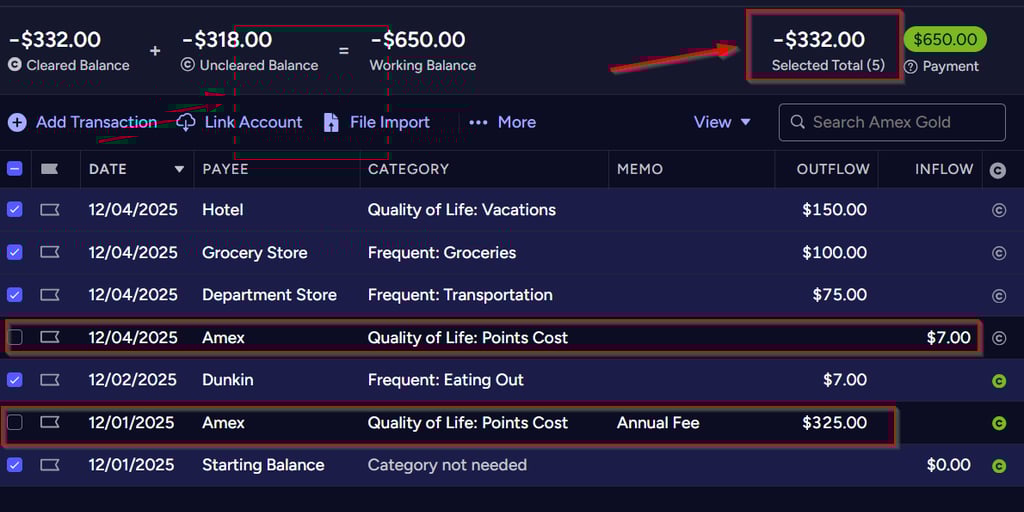
Now, just use your credit card as normal and track all your spending in YNAB. Then, on a regular basis, check the total amount you've spent in YNAB:
Open the card account view
Select all the transactions
UN-Select the annual fee (remember, they don't count towards MS requirements), any payments, refunds, rebates and cash-advances or any other non-qualifying purchases
Look at the total in the top right corner: that's how much you've spent towards your minimum spend!
💥 Step 4: Protect Yourself from Interest and Late Fees
Points are never worth debt.
Using YNAB makes sure you:
Always assign money to buy only what you can afford
Always have the cash to pay in full
Never accidentally carry debt while chasing bonuses
If you set up and use your credit cards correctly in YNAB, you’re protected.
📊 Step 5: Use Reports to See Your Real Cost of Travel
Here’s where things get fun.
At the end of the year (or ahead of a big trip), open YNAB’s Reflect tab and look at your "Income Vs Expense" report. Filter by the Categories: Points Cost and Vacations (or whichever categories you set up)
Now you can answer:
How much did that “free” trip actually cost?
How much did I spend to earn this signup bonus?
Which card perks are totally worth it — and which were meh?
YNAB gives you the real math to make easy decisions. No more guessing whether you came out ahead.
🎁 Bonus Tip: Use YNAB to Plan Your Dream Trips
Once you know the cost side, you can start funding your future travel with intention.
Examples:
Budget $150/month into a “Paris 2027” fund
Track the cash you’ll need for fees/taxes on award bookings
Now you’re not just earning points — you’re planning travel like a pro.
🛫 Final Thoughts
Playing the points-and-miles game is awesome — but only if you stay organized, avoid debt, and know the true costs.
YNAB gives you:
Visibility
Confidence
And the data to make smart reward decisions, and smart "what's in my sock drawer" decisions
If you want help getting set up, I’d love to walk you through it — it’s one of my favorite money nerd topics!
Meet me on my Socials
Navigation
I am a YNAB Certified Coach, which means that I have been trained to coach people on using YNAB software and the YNAB method. I have met select requirements of YNAB in order to receive this certification, which means that I have the ability to competently coach YNAB to others. I am not an employee of YNAB, and all non-YNAB related opinions and recommendations are my own. My views do not reflect the views of YNAB and its employees or its affiliates.
Email Me
Send me any questions or just say hi!
© 2026. All rights reserved.